
Scrum में Continuous Integration: संपूर्ण गाइड 2025
 Scrum में Continuous Integration - संपूर्ण गाइड
Scrum agile project management के लिए एक लोकप्रिय framework है, जबकि Continuous Integration (CI) एक software development practice है जो codebases को स्वस्थ रखती है - code changes को automatically merge, build और test करके - दिन में कई बार। जब ये दोनों concepts मिलते हैं, तो teams उच्च-गुणवत्ता वाला software तेज़ी से deliver करती हैं और Sprint के अंत में बहुत कम आश्चर्य होते हैं।
पारंपरिक दृष्टिकोण Sprints के अंत में incremental software release करना है। CI अपनाने से Sprint cadence और Scrum events का सम्मान करते हुए अधिक बार validate और यहां तक कि release करने की flexibility मिलती है।
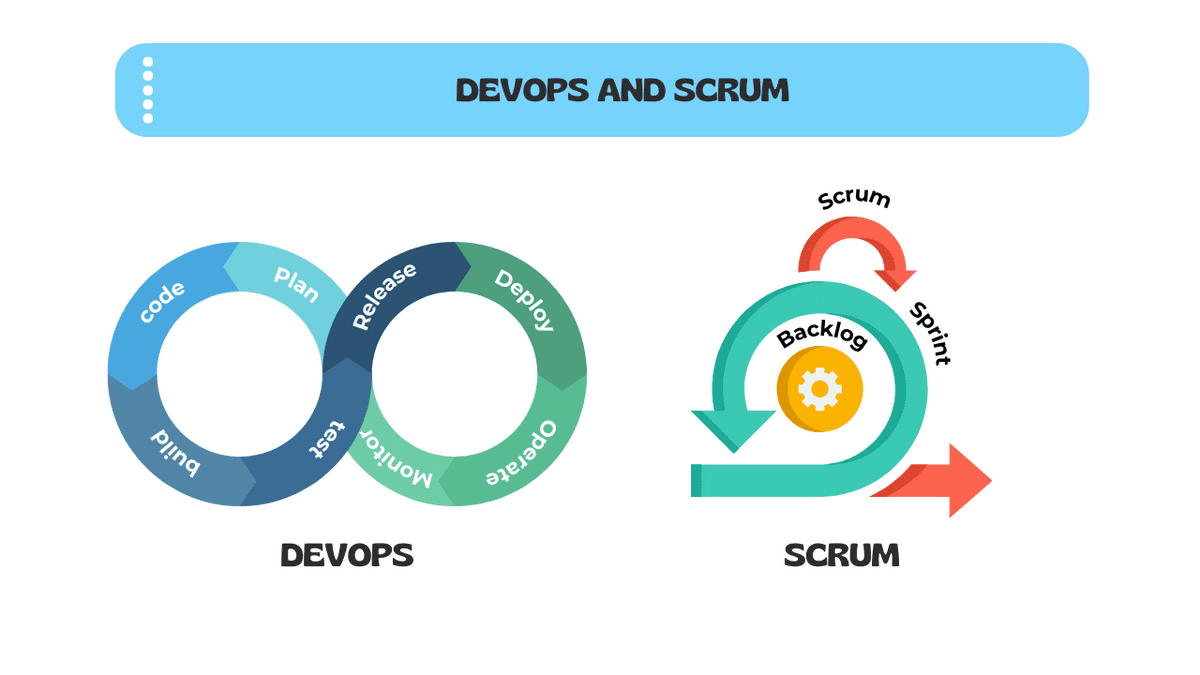 Scrum के साथ DevOps
💡
मुख्य बात Scrum के सार को बनाए रखते हुए तेज़, अधिक विश्वसनीय software delivery के लिए CI की शक्ति का उपयोग करना है।
त्वरित उत्तर: CI vs CD vs Continuous Deployment
| Practice | क्या करती है | Trigger | Human Gate? |
|---|---|---|---|
| Continuous Integration (CI) | हर code change पर automatically merge, build और tests run करती है | हर commit/push | नहीं - पूरी तरह automated |
| Continuous Delivery (CD) | CI को extend करके release-ready artifact बनाती है | CI pass होने के बाद | हां - manual release decision |
| Continuous Deployment | हर passing build को automatically production में deploy करती है | CI/CD pass होने के बाद | नहीं - production में पूरी तरह automated |
अधिकांश Scrum teams CI plus Continuous Delivery practice करती हैं, Product Owner के पास release decision रखते हुए बाकी सब कुछ automate करती हैं।
इस गाइड में आप क्या सीखेंगे
- CI pipeline की core mechanics और उसके output को कैसे पढ़ें
- CI कैसे directly Sprint Planning, Daily Scrum, Sprint Review और Sprint Retrospective से map करती है
- Key CI metrics जो हर Scrum team को track करनी चाहिए (build frequency, failure rate, MTTR)
- Healthcare, FinTech, E-commerce और अन्य के लिए industry-specific CI checklists
- अपनी team को benchmark करने के लिए तीन-stage CI Maturity Model
- आठ सबसे आम CI anti-patterns और उन्हें कैसे ठीक करें
- CI enablers के रूप में Feature toggles और trunk-based development
विषय सूची-
- Continuous Integration क्या है?
- CI Pipeline की संरचना
- Scrum में Continuous Integration के लाभ
- CI और Scrum Events: कैसे Integrate होते हैं
- हर Scrum Team के लिए CI Metrics और KPIs
- अपनी Scrum Practice में CI Implement करना
- CI और Definition of Done
- Industry-Specific CI Checklists
- Scrum Teams के लिए CI Maturity Model
- 8 Common CI Anti-Patterns और उन्हें कैसे ठीक करें
- Continuous Integration की संस्कृति विकसित करना
- निष्कर्ष
Continuous Integration क्या है?
Continuous Integration (CI) एक software development practice है जिसमें हर developer अपने code changes को एक shared repository में दिन में कई बार merge करता है। हर merge एक automated pipeline को trigger करती है जो software build करती है और tests की एक suite run करती है।
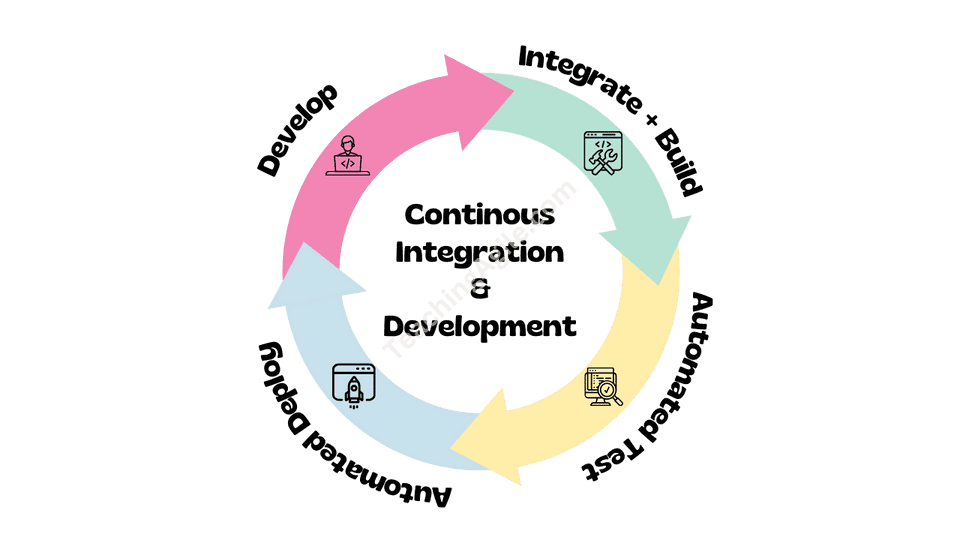 Scrum में Continuous Integration को समझना
CI के तीन non-negotiable नियम हैं:
- बार-बार commit करें - कम से कम दिन में एक बार, ideally कई बार
- Automatically build करें - हर commit एक build trigger करती है, कोई अपवाद नहीं
- Broken builds तुरंत ठीक करें - एक broken build team की सर्वोच्च priority है जब तक वो pass न हो जाए
CI मूल रूप से integration की cost को कम करने के बारे में है। जब developers दिनों या हफ्तों तक अलग-अलग काम करते हैं, तो उनके काम को merge करना महंगा, जोखिम भरा और धीमा हो जाता है। CI उस cost को लगभग शून्य रखती है continuous integration के द्वारा।
💡
विचार यह है कि प्रगति करते रहें और उन परिवर्तनों का जल्द से जल्द और अक्सर testing करें। Integration pain एक lagging indicator है - CI इसे एक तत्काल, सस्ते signal में बदल देती है।
CI Pipeline की संरचना
एक CI pipeline automated steps का एक sequence है जो हर code change पर execute होती है।
| Stage | क्या होता है | Typical Duration |
|---|---|---|
| Source | Code shared repo में push/merge होता है | Seconds |
| Build | Compiler या build tool artifact generate करता है | 1-5 मिनट |
| Unit Tests | Fast, isolated tests individual functions verify करते हैं | 1-10 मिनट |
| Static Analysis | Linting, code style और security scanning | 1-3 मिनट |
| Integration Tests | Tests जो component interactions verify करते हैं | 5-20 मिनट |
| Package | Artifact versioned और stored होता है | 1-2 मिनट |
| Notify | Pass/fail result team channel में post होता है | Seconds |
Pipeline design principles:
- Fail fast - सबसे तेज़ checks पहले run करें ताकि developers को 10 मिनट से कम में feedback मिले
- Parallelize - total time कम करने के लिए independent stages simultaneously run करें
- Cache dependencies - हर run पर packages re-download करने से बचें
- Green रखें - permanently red pipeline होना, कोई pipeline न होने से भी बुरा है
Scrum में Continuous Integration के लाभ
Scrum Team के भीतर Continuous Integration implement करने से समय के साथ compounding advantages मिलते हैं:
- कम integration conflicts - code changes बार-बार integrate करने से merge conflicts की संभावना नाटकीय रूप से कम हो जाती है
- तेज़ feedback - automated tests मिनटों में results देते हैं, दिनों में नहीं
- बेहतर code quality - automated testing के साथ regular integration regressions को जल्दी पकड़ती है
- बढ़ा हुआ collaboration - CI codebase की state की shared visibility बनाती है
- बढ़ी हुई adaptability - चूंकि codebase हमेशा releasable state में होता है, Development Team बदलती requirements के जवाब दे सकती है
- Sprint predictability - strong CI वाली teams Sprints को अधिक consistently finish करती हैं
- Done को support करती है - CI quality gates को automate करती है जो Definition of Done का हिस्सा हैं
CI और Scrum Events: कैसे Integrate होते हैं
Sprint Planning
Sprint Planning के दौरान CI data forecast को improve करता है:
- Build duration trend - अगर builds धीमे हो रहे हैं, तो pipeline maintenance work factor करें
- Flaky test rate - unreliable tests capacity consume करते हैं; उन्हें ठीक करने के लिए समय plan करें
- Technical debt items - CI healthy रखने के लिए infrastructure improvements Sprint Backlog में हैं
- Pipeline capability - अगर किसी नए feature को नई test infrastructure की ज़रूरत है, तो उस काम को explicitly plan करें
Daily Scrum
Daily Scrum को CI dashboard reference करना चाहिए:
- कल के commit का broken build agenda का पहला item है
- Team किसी भी pipeline failures की चर्चा करती है जो progress को block कर रहे हैं
- "क्या build green है?" एक standard daily question बन जाता है
- Flaky tests जो false failures का कारण बने, note किए जाते हैं और fix करने के लिए assign किए जाते हैं
Sprint Review
Sprint Review के दौरान CI stakeholders को confidence देती है:
- केवल वो काम जो सभी CI gates pass कर चुका है, demonstrate किया जा सकता है
- Teams pipeline dashboard को automated quality checks के proof के रूप में दिखा सकती हैं
- Staging environment में deployment CI-triggered है
Sprint Retrospective
Sprint Retrospectives CI health inspect करने के लिए ideal हैं:
- Sprint के लिए build failure rate review करें - बढ़ रहा है या घट रहा है?
- Slowest pipeline stages identify करें और improvements plan करें
- Flaky tests discuss करें जिन्होंने confidence को undermine किया
- Next Sprint के लिए एक concrete CI improvement goal set करें
हर Scrum Team के लिए CI Metrics और KPIs
| Metric | Definition | Healthy Target |
|---|---|---|
| Build Frequency | Per day team में builds की संख्या | 5+ builds per developer per day |
| Build Success Rate | Builds का percentage जो pass करते हैं | >90% (aim for >95%) |
| Build Duration | Commit से green/red result तक का समय | <10 minutes for feedback loop |
| MTTR | Failure से next green build तक average समय | <60 minutes |
अपनी Scrum Practice में CI Implement करना
Step 1 - Version Control Foundation: Git को version control system के रूप में उपयोग करें। Branching strategy establish करें - CI के लिए trunk-based development strongly recommended है। CI status checks के साथ main branch protect करें।
Step 2 - Build और Test Automate करें: Automated build और test pipelines setup करें। Common CI platforms: GitHub Actions, GitLab CI, Jenkins, Azure DevOps। Unit tests run करें, integration tests और critical user journeys के लिए E2E tests।
Step 3 - Merge Frequency Establish करें: सबसे आम CI failure technical नहीं है - यह behavioral है। Developers जो हफ्ते में एक बार merge करते हैं, वे CI practice नहीं कर रहे, चाहे उनके tools कुछ भी हों। कम से कम दिन में एक बार commit करें, ideally कई बार।
Step 4 - Failures Visible बनाएं: Build results को real time में team channel पर post करें। Physical build radiator display उपयोग करें। उस specific developer के लिए email notifications configure करें जिसके commit ने build break किया।
Step 5 - Trunk-Based Development और Feature Toggles: Trunk-based development वो branching model है जो CI के साथ सबसे compatible है। Feature toggles trunk-based development को large features के लिए practical बनाते हैं - incomplete features एक toggle में wrapped होती हैं, merge की जाती हैं लेकिन users को visible नहीं होतीं।
CI और Definition of Done
CI Definition of Done को objective और non-negotiable बनाने के लिए सबसे शक्तिशाली tools में से एक है।
Strong Definition of Done के लिए recommended CI gates:
- सभी unit tests pass होते हैं (zero failures, zero skips without justification)
- Test coverage agreed threshold से ऊपर रहती है (typically >80%)
- कोई नई critical या high security vulnerabilities नहीं
- Code style और linting checks pass होती हैं
- Build artifact successfully created और stored होता है
- Integration tests clean environment में pass होते हैं
⚠️
एक Definition of Done जिसे automatically verify नहीं किया जा सकता, वो एक ऐसी Definition of Done है जिसे inconsistently apply किया जाएगा। CI वो enforcement mechanism है जो Done को real बनाता है।
Industry-Specific CI Checklists
SaaS और Cloud Services
- Unit tests >80% coverage के साथ passing
- Integration tests clean database के against passing
- Docker/container image built और vulnerabilities के लिए scanned
- Infrastructure-as-Code (Terraform/Pulumi) linted और validated
- Performance benchmarks baseline से compare किए गए
- Feature toggle configuration validated
- Automatically staging environment में deployed
Healthcare
- सभी tests passing (PHI handling code paths के लिए dual review)
- HIPAA compliance checklist pipeline के part के रूप में executed
- PHI data encryption verified (at rest और in transit)
- Audit logging tested और verified सभी PHI access events के लिए
- Role-based access controls MFA scenarios के साथ tested
- Security vulnerability scan passing (कोई critical/high findings नहीं)
Financial Services
- सभी tests passing fraud detection rule validation सहित
- PCI-DSS control tests passing
- SOC 2 control evidence collected और pipeline द्वारा stored
- Encryption standards verified (AES-256, TLS 1.2+)
- Security scan passing (payment flows में कोई critical findings नहीं)
E-commerce
- सभी tests passing cart और checkout flows सहित
- Payment gateway integration tests passing (Stripe, PayPal sandbox)
- Performance tests - 1000 concurrent users पर 3 seconds के अंदर page load
- Mobile responsiveness tests passing
- Inventory management integration tests passing
Mobile Apps
- Unit और integration tests passing
- UI tests minimum supported OS versions पर passing
- App store compliance checks (कोई private APIs नहीं)
- Battery और memory profiling acceptable thresholds के अंदर
- Offline mode functionality tested
- Accessibility tests passing (VoiceOver/TalkBack)
Enterprise DevOps
- सभी tests passing infrastructure smoke tests सहित
- Infrastructure-as-Code linted और plan validated
- Security scanning complete (SAST, DAST, dependency vulnerabilities)
- Container image scanning passing (कोई critical CVEs नहीं)
- Rollback procedure tested और pipeline में documented
- Observability configuration validated (dashboards, alerts, traces)
Scrum Teams के लिए CI Maturity Model
Stage 1 - Basic CI
Timeline: Sprints 1-6 (नई teams या teams जो scratch से CI शुरू कर रही हैं)
Characteristics:
- Version control उपयोग में, लेकिन branching strategy informal है
- Manual builds एक developer द्वारा trigger किए जाते हैं
- कुछ automated tests मौजूद हैं लेकिन enforce नहीं किए जाते
- Build failures eventually notice किए जाते हैं लेकिन urgently नहीं
Typical metrics:
- Build frequency: पूरी team के लिए प्रतिदिन 1-3
- Build success rate: 60-80%
- Build duration: unpredictable, अक्सर >20 मिनट
- MTTR: कई घंटों से दिनों तक
Stage 2 - Intermediate CI
Timeline: Sprints 7-15
Characteristics:
- CI platform main पर हर commit पर running
- Unit और integration tests automated
- Merge requirements द्वारा builds protected
- Build failures उसी दिन ठीक किए जाते हैं
- Team retrospectives में CI health discuss करती है
Typical metrics:
- Build frequency: team के लिए प्रतिदिन 10-20
- Build success rate: 80-90%
- Build duration: 5-15 मिनट
- MTTR: <2 घंटे
Stage 3 - Advanced CI
Timeline: Sprint 16+
Characteristics:
- Feature toggles के साथ Trunk-based development
- Comprehensive test automation (>80% coverage)
- Security, performance और accessibility testing automated
- Builds 10 मिनट से कम में complete होते हैं
- Build failures को production incidents की तरह treat किया जाता है
- CI gates complete Definition of Done enforce करते हैं
Typical metrics:
- Build frequency: प्रति developer प्रतिदिन 5+
- Build success rate: >95%
- Build duration: <10 मिनट
- MTTR: <30 मिनट
8 Common CI Anti-Patterns और उन्हें कैसे ठीक करें
Anti-Pattern 1: Nightly Build
Problem: Team हर commit की बजाय रात में एक बार builds run करती है।
क्यों problematic है: Defects दिनभर accumulate होते हैं और diagnose करना expensive हो जाता है। Developers code लिखने के 12+ घंटे बाद feedback receive करते हैं।
Fix: CI platform को हर push पर trigger होने के लिए configure करें। अगर capacity limited है तो main branch से शुरू करें।
Anti-Pattern 2: Red Build को Ignore करना
Problem: CI dashboard कई दिनों से red है और team उसके around काम करती रहती है।
क्यों problematic है: Broken build का मतलब है team के पास कोई reliable signal नहीं है। नई failures invisible हैं।
Fix: Build green होने तक सभी feature work रोकें। पूरी team के support के साथ build fix एक developer को assign करें।
Anti-Pattern 3: Giant Feature Branch
Problem: Developers merge करने से पहले हफ्तों तक अलग-अलग long-lived branches पर काम करते हैं।
क्यों problematic है: Long-lived branches CI को meaningless बना देती हैं। Merge खुद एक multi-day integration event बन जाता है।
Fix: Trunk-based development adopt करें। Large features को vertical slices में break करें। Incomplete functionality छुपाने के लिए feature toggles उपयोग करें।
Anti-Pattern 4: Slow Pipeline Syndrome
Problem: CI pipeline को complete होने में 45+ मिनट लगते हैं।
क्यों problematic है: Developers results का इंतजार करना बंद कर देते हैं, feedback bypass करते हैं और अगला task शुरू करते हैं।
Fix: Slowest stages find करने के लिए pipeline profile करें। Independent test suites parallelize करें। Slow E2E tests को nightly run में move करें।
Anti-Pattern 5: Flaky Test Tolerance
Problem: Team ऐसी test suite accept करती है जिसमें 10-15% tests inconsistent pass/fail results produce करते हैं।
क्यों problematic है: Flaky tests pipeline पर trust को erode करते हैं।
Fix: Flaky test rate को metric के रूप में track करें। कोई भी test जो code change के बिना fail होता है, immediately fix किया जाता है।
Anti-Pattern 6: Test Coverage Theater
Problem: Team 80% test coverage report करती है लेकिन critical business logic में केवल 20% coverage है।
क्यों problematic है: Raw coverage numbers misleading हैं।
Fix: Uncovered critical paths identify करने के लिए coverage reports उपयोग करें। Test quality verify करने के लिए mutation testing add करें।
Anti-Pattern 7: Security Scanning को Afterthought की तरह
Problem: Security scans केवल major releases से पहले run होती हैं, हर build पर नहीं।
क्यों problematic है: Vulnerabilities महीनों तक accumulate होती हैं।
Fix: हर build में dependency vulnerability scanning add करें। Critical vulnerabilities detect होने पर merges block करें।
Anti-Pattern 8: Environment Drift
Problem: CI, staging और production environment अलग-अलग configure हैं।
क्यों problematic है: CI test results को production confidence के रूप में trust नहीं किया जा सकता।
Fix: सभी environments define करने के लिए Infrastructure-as-Code उपयोग करें। Identical runtime environments के लिए containers (Docker) उपयोग करें।
Continuous Integration की संस्कृति विकसित करना
अकेले Technical implementation CI को successful नहीं बनाती। CI के आसपास की practices और culture निर्धारित करती हैं कि यह अपना पूरा value deliver करती है या नहीं।
-
बार-बार integrate करें: बार-बार integration से problems की तेज़ पहचान और resolution होती है, और Sprint end पर बहुत कम rework होती है।
-
Integration results visible बनाएं: जब integration fail होती है, तो यह team के सभी लोगों को visible होनी चाहिए। Prominently displayed build board codebase health के बारे में ambiguity remove करता है।
-
Failed integrations fix करने को prioritize करें: जब build break होता है, तो यह team की highest priority बन जाती है - नई feature development से पहले। यह team की consistently deliver करने की ability protect करता है।
-
Supportive software engineering practices apply करें: CI सबसे effective है इनके साथ: Test-Driven Development (TDD), modular architecture, Infrastructure-as-Code, pair programming और code review।
निष्कर्ष
Continuous Integration केवल एक DevOps tool नहीं है - यह एक core practice है जो Scrum Teams को हर Sprint में confidence के साथ potentially releasable Increments deliver करने में सक्षम बनाती है।
दिन में कई बार code integrate करके, build और test execution को automate करके, और broken builds को urgent team events के रूप में treat करके, Scrum teams उस integration risk को eliminate करती हैं जो traditionally एक Sprint के दौरान accumulate होता है।
Simple शुरू करें, continuously improve करें:
- अगर आज कोई CI नहीं है: इस Sprint में हर commit पर automated builds setup करें
- अगर CI है लेकिन slow है: 10 मिनट से कम के लिए profile और parallelize करें
- अगर CI fast है: security scanning add करें और इसे Definition of Done gate बनाएं
- अगर CI Done enforce करती है: feature toggles के साथ trunk-based development adopt करें
प्रश्नोत्तरी: Continuous Integration
आपका स्कोर: 0/15
प्रश्न: Article में describe की गई Continuous Integration की तीन non-negotiable rules क्या हैं?
आगे पढ़ें
Definition of Done: Scrum में Quality Standardsजानें कि Definition of Done CI gates के साथ कैसे integrate होती है ताकि हर Increment automatically quality standards पूरा करे।
Agile Testing: Quality पर Scrum का जोरउन testing practices discover करें जो automated test suite बनाती हैं जो आपके CI pipeline को power करती है।
Sprint Retrospective: Team Performance बढ़ाएंजानें CI metrics inspect करने और हर Sprint में pipeline improvements plan करने के लिए Sprint Retrospectives का उपयोग कैसे करें।
Sprint Planning: Effective Scrum Execution की गाइडPlanning के दौरान अधिक accurate Sprint forecasts के लिए CI build frequency और success rate data का उपयोग करें।
Scrum में Product Incrementसमझें कि CI हर commit पर quality gates enforce करके हर Increment को potentially releasable कैसे ensure करती है।
Daily Scrum: Effective Stand-Up Meetingदेखें कि CI build board एक radiator के रूप में कैसे serve करता है जो Daily Scrum conversation को codebase health के आसपास anchor करता है।
Scrum में Continuous ImprovementExplore करें कि CI metrics empirical improvement cycle को कैसे drive करती हैं जो Scrum teams को progressively faster और more reliable बनाती है।
Sprint 0: Objectives और Benefits की Complete Guideजानें क्यों Sprint Zero आपकी CI pipeline, branching strategy और Definition of Done quality gates establish करने का सही समय है।
अक्सर पूछे जाने वाले प्रश्न (FAQs)
Continuous Integration, Continuous Delivery और Continuous Deployment में क्या अंतर है?
क्या एक Scrum team बिना dedicated DevOps engineer के successfully CI adopt कर सकती है?
Scrum Master को Continuous Integration adopt करने में team को कैसे support करना चाहिए?
Remote और distributed Scrum teams CI के cultural aspects को कैसे handle करती हैं?
Technical debt और CI pipeline maintenance के बीच क्या relationship है?
Regulated industries जैसे healthcare और finance में CI compliance requirements के साथ कैसे interact करती है?
Scrum team को क्या करना चाहिए जब CI pipeline प्रति build 45+ मिनट ले रही हो?
Trunk-based development क्या है और CI के लिए optimal branching strategy क्यों माना जाता है?
Scrum team Continuous Integration implement करने के return on investment को कैसे measure कर सकती है?
CI एक Scrum team के भीतर psychological safety को कैसे support करती है?
Organization का size Continuous Integration कैसे structure होनी चाहिए इसे कैसे affect करता है?
Scrum team को क्या करना चाहिए जब CI security scan में dependency vulnerability discover हो?
Continuous Integration का Agile Manifesto के frequently working software deliver करने के principle से क्या relationship है?
Product Owner को team की CI practices के साथ कैसे engage करना चाहिए?
Scrum teams के लिए most common CI tool choices क्या हैं और एक team को कैसे choose करना चाहिए?