
Continuous Integration in Scrum: The Complete 2025 Guide
 Continuous Integration in Scrum - Complete Guide
Scrum is a popular framework for agile project management, while Continuous Integration (CI) is a software development practice that keeps codebases healthy by merging, building, and testing code changes automatically - multiple times per day. When these two concepts are combined, teams deliver high-quality software faster and with far fewer surprises at Sprint end.
The traditional approach is to release an incremental software at the end of Sprints. Adopting CI offers the flexibility to validate and even release more frequently while still respecting the Sprint cadence and Scrum events.
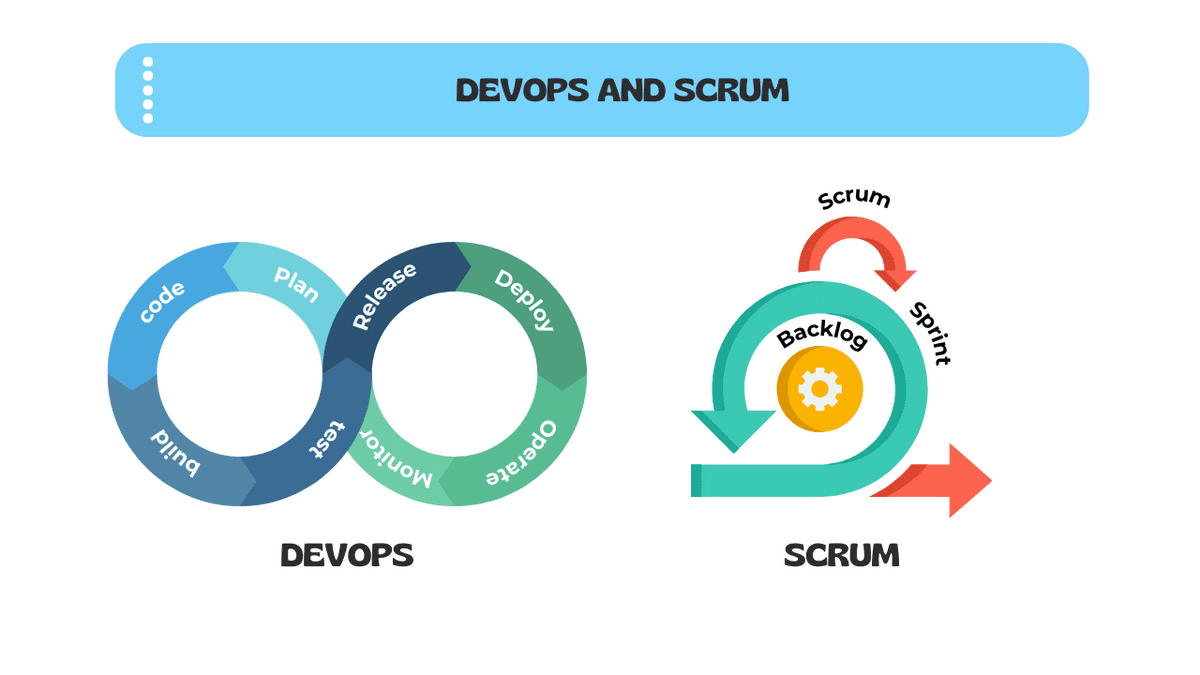 DevOps with Scrum
💡
The key is to maintain the essence of Scrum while harnessing the power of CI for faster, more reliable software delivery.
Quick Answer: CI vs CD vs Continuous Deployment
| Practice | What It Does | Trigger | Human Gate? |
|---|---|---|---|
| Continuous Integration (CI) | Merges, builds, and runs automated tests on every code change | Every commit/push | No - fully automated |
| Continuous Delivery (CD) | Extends CI by packaging a release-ready artifact | After CI passes | Yes - manual release decision |
| Continuous Deployment | Automatically deploys every passing build to production | After CI/CD passes | No - fully automated to prod |
Most Scrum teams practice CI plus Continuous Delivery, keeping the release decision with the Product Owner while automating everything else.
What You'll Learn in This Guide
- The core mechanics of a CI pipeline and how to read its output
- How CI maps directly to Sprint Planning, Daily Scrum, Sprint Review, and Sprint Retrospective
- Key CI metrics every Scrum team should track (build frequency, failure rate, MTTR)
- Industry-specific CI checklists for Healthcare, FinTech, E-commerce, and more
- A three-stage CI Maturity Model to benchmark your team
- The eight most common CI anti-patterns and how to fix them
- Feature toggles and trunk-based development as CI enablers
Table Of Contents-
- What is Continuous Integration?
- The Anatomy of a CI Pipeline
- Benefits of Continuous Integration in Scrum
- CI and Scrum Events: How They Integrate
- CI Metrics and KPIs Every Scrum Team Should Track
- Implementing CI in Your Scrum Practice
- CI and the Definition of Done
- Industry-Specific CI Checklists
- CI Maturity Model for Scrum Teams
- 8 Common CI Anti-Patterns and How to Fix Them
- Cultivating a Culture of Continuous Integration
- Conclusion
What is Continuous Integration?
Continuous Integration (CI) is a software development practice in which every developer merges their code changes into a shared repository multiple times per day. Each merge triggers an automated pipeline that builds the software and runs a suite of tests.
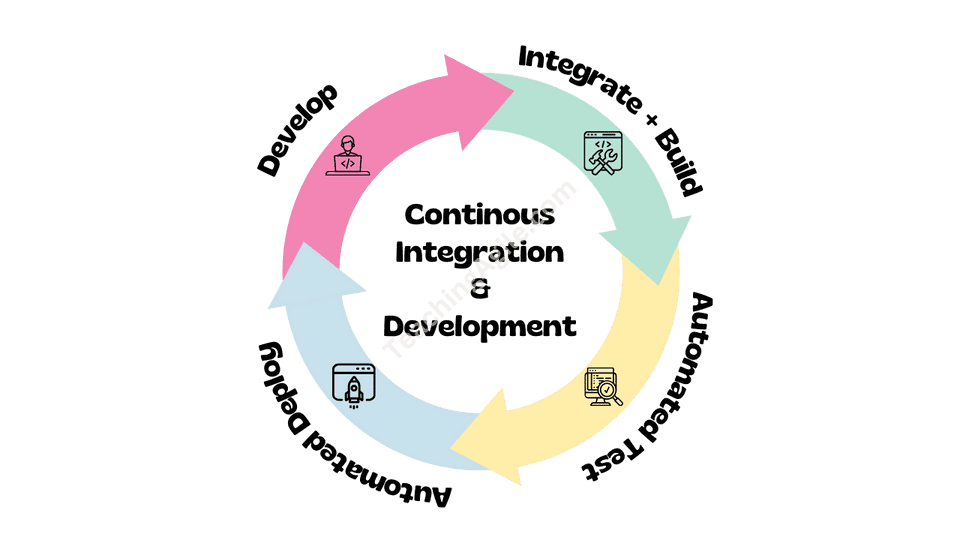 Understanding Continuous Integration in Scrum
The three non-negotiable rules of CI are:
- Commit frequently - at least once per day, ideally multiple times
- Build automatically - every commit triggers a build, no exceptions
- Fix broken builds immediately - a broken build is the team's highest priority until it passes
CI is fundamentally about reducing the cost of integration. When developers work in isolation for days or weeks, merging their work becomes expensive, risky, and slow. CI keeps that cost near zero by integrating continuously.
💡
The idea is to keep making progress and testing those changes as early and often as possible. Integration pain is a lagging indicator - CI transforms it into an immediate, cheap signal.
The Anatomy of a CI Pipeline
A CI pipeline is a sequence of automated steps that execute on every code change. Understanding each stage helps Scrum teams debug failures and optimize throughput.
| Stage | What Happens | Typical Duration |
|---|---|---|
| Source | Code is pushed/merged to the shared repo | Seconds |
| Build | Compiler or build tool generates an artifact | 1-5 minutes |
| Unit Tests | Fast, isolated tests verify individual functions | 1-10 minutes |
| Static Analysis | Linting, code style, and security scanning | 1-3 minutes |
| Integration Tests | Tests that verify component interactions | 5-20 minutes |
| Package | Artifact is versioned and stored | 1-2 minutes |
| Notify | Pass/fail result posted to team channel | Seconds |
Pipeline design principles:
- Fail fast - run the quickest checks first so developers get feedback in under 10 minutes
- Parallelize - run independent stages simultaneously to reduce total time
- Cache dependencies - avoid re-downloading packages on every run
- Keep it green - a permanently red pipeline is worse than no pipeline
Benefits of Continuous Integration in Scrum
Implementing Continuous Integration within a Scrum Team delivers compounding advantages over time:
- Reduced integration conflicts - by integrating code changes frequently, the likelihood of merge conflicts drops dramatically, leading to fewer delays at Sprint end
- Faster feedback - automated tests provide results in minutes, not days, so developers fix defects while the code is still fresh in their minds
- Improved code quality - regular integration with automated testing catches regressions early, preventing quality from degrading Sprint over Sprint
- Increased collaboration - CI creates shared visibility into the state of the codebase, reducing "works on my machine" problems and blame culture
- Enhanced adaptability - because the codebase is always in a releasable state, the Development Team can respond to changing requirements without fear of destabilizing the system
- Sprint predictability - teams with strong CI finish Sprints more consistently because integration surprises are caught daily, not at Sprint end
- Supports Done-ness - CI automates quality gates that form part of the Definition of Done, making Done objectively verifiable
CI and Scrum Events: How They Integrate
One of the most underappreciated aspects of CI is how naturally it maps to the four Scrum events. Understanding this mapping helps teams use CI purposefully rather than as a disconnected technical tool.
Sprint Planning
During Sprint Planning, the team forecasts what can be delivered. CI data improves this forecast:
- Build duration trend - if builds are getting slower, factor in pipeline maintenance work
- Flaky test rate - unreliable tests consume capacity; plan time to fix them
- Technical debt items - infrastructure improvements needed to keep CI healthy belong in the Sprint Backlog
- Pipeline capability - if a new feature requires new test infrastructure, plan that work explicitly
Teams with fast, reliable CI pipelines make more accurate Sprint forecasts because they have objective data about their codebase health.
Daily Scrum
The Daily Scrum should reference the CI dashboard:
- A broken build from yesterday's commit is the first item on the agenda
- The team discusses any pipeline failures that are blocking progress
- "Is the build green?" becomes a standard daily question
- Flaky tests that caused false failures are noted and assigned for fixing
The CI build board serves as a radiator - a visible, shared signal of codebase health that anchors the daily conversation.
Sprint Review
During Sprint Review, CI gives stakeholders confidence:
- Only work that has passed all CI gates can be demonstrated
- Teams can show the pipeline dashboard as proof of automated quality checks
- Deployment to the staging environment is CI-triggered, ensuring the demo environment matches what was built
- Stakeholders see actual test coverage and quality metrics, not just feature demos
Sprint Retrospective
Sprint Retrospectives are ideal for inspecting CI health:
- Review the build failure rate for the Sprint - is it trending up or down?
- Identify the slowest pipeline stages and plan improvements
- Discuss flaky tests that undermined confidence
- Celebrate improvements in build speed or coverage
- Set a concrete CI improvement goal for the next Sprint
CI Metrics and KPIs Every Scrum Team Should Track
Metrics transform CI from a feeling into an objective measure of team health. These are the four metrics that matter most:
| Metric | Definition | Healthy Target |
|---|---|---|
| Build Frequency | Number of builds per day across the team | 5+ builds per developer per day |
| Build Success Rate | Percentage of builds that pass | >90% (aim for >95%) |
| Build Duration | Time from commit to green/red result | <10 minutes for feedback loop |
| Mean Time to Repair (MTTR) | Average time from failure to next green build | <60 minutes |
Additional metrics worth tracking:
- Test coverage - percentage of code exercised by automated tests (aim for >80%)
- Flaky test rate - tests that produce inconsistent results (keep below 2%)
- Pipeline queue time - time spent waiting for a build agent to start
- Change Failure Rate - percentage of deployments causing production incidents
💡
DORA research (DevOps Research and Assessment) shows that elite engineering teams deploy multiple times per day with a change failure rate below 15%. CI is the foundation that makes this possible.
Implementing CI in Your Scrum Practice
Step 1 - Version Control Foundation
Every CI implementation starts with a solid version control foundation:
- Use Git as your version control system (the de facto standard)
- Establish a branching strategy - trunk-based development is strongly recommended for CI
- Protect the main/trunk branch with CI status checks - no merge without a green build
- Require pull request reviews before merging to maintain code quality
- Tag releases with semantic versioning for traceability
Step 2 - Automate Build and Test
Set up automated build and test pipelines using tools appropriate to your stack:
CI Platforms:
- GitHub Actions, GitLab CI, Bitbucket Pipelines (source-integrated)
- Jenkins, TeamCity, CircleCI (dedicated CI servers)
- Azure DevOps, AWS CodeBuild, Google Cloud Build (cloud-native)
Test Automation Essentials:
- Unit tests that run in under a second each
- Integration tests for component interactions
- Contract tests for API boundaries
- End-to-end tests for critical user journeys (keep this suite small and fast)
Key principle: If a test suite takes more than 10 minutes, developers stop waiting for results and bypass the feedback loop. Speed is a feature of your CI pipeline.
Step 3 - Establish Merge Frequency
The most common CI failure is not technical - it is behavioral. Developers who merge once per week are not practicing CI regardless of their tooling.
Team agreements to establish:
- Commit to the shared branch at least once per day, ideally multiple times
- Feature branches should not live longer than one day (use feature toggles for longer work)
- Never leave the office with a broken build - fix it or revert before the day ends
- Every failed build gets a Jira/Linear ticket or immediate fix - no ignoring red builds
Step 4 - Make Failures Visible
A CI build that fails silently is useless. Make failures impossible to ignore:
- Post build results to the team's Slack/Teams channel in real time
- Use a physical build radiator (a monitor showing the pipeline dashboard)
- Configure email notifications for the specific developer whose commit broke the build
- Track build history in your team's metrics dashboard
- Add build status badges to your repository README
Step 5 - Trunk-Based Development and Feature Toggles
Trunk-based development is the branching model most compatible with CI. Developers commit directly to a single shared branch (trunk/main) or use very short-lived feature branches (less than 24 hours).
Feature toggles (also called feature flags) make trunk-based development practical for large features:
- Incomplete features are wrapped in a toggle - merged but not visible to users
- The toggle is enabled for internal testing when the feature is ready
- Gradual rollout becomes possible - enable for 1% of users, then 10%, then 100%
- Toggles must be cleaned up after full release to prevent accumulation of dead code
// Example feature toggle pattern
if (featureFlags.isEnabled('new-checkout-flow', user)) {
  return <NewCheckoutFlow />
} else {
  return <LegacyCheckoutFlow />
}
CI and the Definition of Done
CI is one of the most powerful tools for making the Definition of Done objective and non-negotiable. When CI gates enforce Done criteria automatically, teams cannot accidentally declare work Done when it is not.
Recommended CI gates for a strong Definition of Done:
- All unit tests pass (zero failures, zero skips without justification)
- Test coverage remains above the agreed threshold (typically >80%)
- No new critical or high security vulnerabilities (from SAST/DAST scanning)
- Code style and linting checks pass (zero errors)
- Build artifact is successfully created and stored
- Integration tests pass in a clean environment
- Performance benchmarks are not regressed (for performance-sensitive features)
- Accessibility checks pass (for user-facing features)
⚠️
A Definition of Done that cannot be verified automatically is a Definition of Done that will be inconsistently applied. CI is the enforcement mechanism that makes Done real.
When a story is merged and all CI gates pass, the team has objective evidence that the Increment meets quality standards - not just a developer's word for it.
Industry-Specific CI Checklists
Different industries have unique compliance and quality requirements that must be reflected in their CI pipelines.
SaaS and Cloud Services
- Unit tests passing with >80% coverage
- Integration tests passing against a clean database
- API contract tests passing (no breaking changes)
- Docker/container image built and scanned for vulnerabilities
- Infrastructure-as-code (Terraform/Pulumi) linted and validated
- Uptime monitoring configuration validated
- Performance benchmarks compared to baseline (response time, throughput)
- Feature toggle configuration validated
- Deployed to staging environment automatically
Healthcare
- All tests passing (dual review for PHI-handling code paths)
- HIPAA compliance checklist executed as part of pipeline
- PHI data encryption verified (at rest and in transit)
- Audit logging tested and verified for all PHI access events
- Role-based access controls tested with MFA scenarios
- Security vulnerability scan passing (no critical/high findings)
- Business Associate Agreement (BAA) integration points tested
- Data retention policy enforcement verified
- Deployed to HIPAA-compliant staging environment
Financial Services
- All tests passing including fraud detection rule validation
- PCI-DSS control tests passing (cardholder data scope validated)
- SOC 2 control evidence collected and stored by pipeline
- Encryption standards verified (AES-256, TLS 1.2+)
- Audit trail completeness tests passing
- Financial calculation accuracy tests (rounding, currency, edge cases)
- Regulatory reporting format validation
- Security scan passing (no critical findings in payment flows)
- Disaster recovery configuration validated
E-commerce
- All tests passing including cart and checkout flows
- Payment gateway integration tests passing (Stripe, PayPal sandbox)
- Performance tests - page load under 3 seconds at 1000 concurrent users
- Mobile responsiveness tests passing
- SEO metadata validation passing
- Inventory management integration tests passing
- Email notification templates validated
- A/B test configuration validated
- CDN cache invalidation tested
Mobile Apps
- Unit and integration tests passing
- UI tests passing on minimum supported OS versions
- App store compliance checks (no private APIs, metadata validated)
- Battery and memory profiling within acceptable thresholds
- Offline mode functionality tested
- Push notification delivery tested in staging
- Deep link routing tests passing
- Accessibility tests passing (VoiceOver/TalkBack)
- Build artifact signed and uploaded to TestFlight/Firebase Distribution
Enterprise DevOps
- All tests passing including infrastructure smoke tests
- Infrastructure-as-code linted and plan validated (no destructive changes without approval)
- Security scanning complete (SAST, DAST, dependency vulnerabilities)
- Container image scanning passing (no critical CVEs)
- Rollback procedure tested and documented in pipeline
- Configuration management validated across all environments
- Service mesh / API gateway configuration tests passing
- Compliance policy-as-code checks passing (OPA/Conftest)
- Observability configuration validated (dashboards, alerts, traces)
CI Maturity Model for Scrum Teams
Teams do not implement CI perfectly overnight. This maturity model helps you benchmark your current state and plan the next improvement.
Stage 1 - Basic CI
Timeline: Sprints 1-6 (new teams or teams starting CI from scratch)
Characteristics:
- Version control in use, but branching strategy is informal
- Manual builds triggered by a developer
- Some automated tests exist but are not enforced
- Build failures are noticed eventually but not urgently
Typical metrics:
- Build frequency: 1-3 per day for the whole team
- Build success rate: 60-80%
- Build duration: unpredictable, often >20 minutes
- MTTR: several hours to days
What to add next:
- Automate build on every commit with a simple CI platform (GitHub Actions is a good start)
- Require all unit tests to pass before merge
- Create a team channel notification for build failures
Stage 2 - Intermediate CI
Timeline: Sprints 7-15
Characteristics:
- CI platform running on every commit to main
- Unit and integration tests automated
- Builds protected by merge requirements
- Build failures are fixed within the same day
- Team is discussing CI health in retrospectives
Typical metrics:
- Build frequency: 10-20 per day for the team
- Build success rate: 80-90%
- Build duration: 5-15 minutes
- MTTR: <2 hours
What to add next:
- Add static analysis and security scanning
- Implement test coverage thresholds
- Introduce trunk-based development and feature toggles
- Start tracking and displaying metrics on a dashboard
Stage 3 - Advanced CI
Timeline: Sprint 16+
Characteristics:
- Trunk-based development with feature toggles
- Comprehensive test automation (>80% coverage)
- Security, performance, and accessibility testing automated
- Builds complete in under 10 minutes
- Build failures are treated as production incidents
- CI gates enforce the complete Definition of Done
- Metrics reviewed every Sprint Retrospective
Typical metrics:
- Build frequency: 5+ per developer per day
- Build success rate: >95%
- Build duration: <10 minutes
- MTTR: <30 minutes
What to add next:
- Canary deployments and automated rollback
- Chaos engineering tests in staging
- AI-assisted flaky test detection
- Cross-team CI federation and shared pipeline templates
8 Common CI Anti-Patterns and How to Fix Them
Anti-Pattern 1: The Nightly Build
Problem: The team runs builds once per night rather than on every commit.
Why it is problematic: Defects accumulate throughout the day and become expensive to diagnose. Developers receive feedback 12+ hours after writing code - long after the context is gone.
Fix: Configure the CI platform to trigger on every push to any branch. Start with the main branch if capacity is limited.
Prevention: Include "build on every commit" as a non-negotiable in your team's working agreement.
Anti-Pattern 2: Ignoring the Red Build
Problem: The CI dashboard has been red for days and the team continues working around it.
Why it is problematic: A broken build means the team has no reliable signal. New failures are invisible. The pipeline is security theater.
Fix: Stop all feature work until the build is green. Assign the build fix to one developer with the full team's support. Consider a team-level rule that no new commits are merged while the build is broken.
Prevention: Track "days with a broken build" as a Sprint metric. Treat zero as the target.
Anti-Pattern 3: The Giant Feature Branch
Problem: Developers work on separate long-lived branches for weeks before merging.
Why it is problematic: Long-lived branches make CI meaningless. The merge itself becomes a multi-day integration event, exactly what CI is designed to prevent.
Fix: Adopt trunk-based development. Break large features into vertical slices that can be merged safely. Use feature toggles to hide incomplete functionality.
Prevention: Set a branch lifetime policy - feature branches must be merged within 24 hours of creation.
Anti-Pattern 4: Slow Pipeline Syndrome
Problem: The CI pipeline takes 45+ minutes to complete.
Why it is problematic: Developers stop waiting for results, bypass feedback, and start the next task. The feedback loop is broken.
Fix: Profile the pipeline to find the slowest stages. Parallelize independent test suites. Move slow E2E tests to a nightly run rather than every commit. Cache dependencies aggressively.
Prevention: Add build duration as a pipeline metric with an alert when it exceeds 10 minutes.
Anti-Pattern 5: Flaky Test Tolerance
Problem: The team accepts a test suite with 10-15% of tests that produce inconsistent pass/fail results.
Why it is problematic: Flaky tests erode trust in the pipeline. Developers start re-running builds hoping for a green result rather than fixing real problems.
Fix: Track flaky test rate as a metric. Any test that fails without a code change is automatically added to a "flaky test" Jira epic and fixed within the Sprint.
Prevention: Set a flaky test rate threshold (e.g., below 2%) and enforce it in retrospectives.
Anti-Pattern 6: Test Coverage Theater
Problem: The team reports 80% test coverage but the tests are trivial getters/setters and the critical business logic has 20% coverage.
Why it is problematic: Raw coverage numbers are misleading. The team has false confidence in their test suite.
Fix: Use coverage reports to identify uncovered critical paths. Add mutation testing to verify test quality, not just quantity. Review coverage by module, not just overall percentage.
Prevention: Include "critical path coverage" as a separate metric from overall coverage.
Anti-Pattern 7: Security Scanning as an Afterthought
Problem: Security scans run only before major releases, not on every build.
Why it is problematic: Vulnerabilities accumulate over months. A dependency introduced in Sprint 2 with a known CVE is discovered in Sprint 20, requiring emergency patching.
Fix: Add dependency vulnerability scanning (e.g., Snyk, Dependabot, OWASP Dependency-Check) to every build. Block merges when critical vulnerabilities are detected.
Prevention: Define "no critical security vulnerabilities" as part of the Definition of Done and enforce it in CI.
Anti-Pattern 8: Environment Drift
Problem: The CI environment, staging environment, and production environment are configured differently - what passes in CI fails in production.
Why it is problematic: CI test results cannot be trusted as production confidence. Deployments carry hidden risk.
Fix: Use Infrastructure-as-Code to define all environments. Use containers (Docker) to ensure identical runtime environments. Validate environment configuration as part of the pipeline.
Prevention: Require that all environment changes go through CI, including infrastructure configuration.
Cultivating a Culture of Continuous Integration
Technical implementation alone does not make CI successful. The practices and culture surrounding CI determine whether it delivers its full value.
Integrate frequently: Frequent integration leads to quicker problem identification. Teams should automate the process and embrace the discipline of daily commits, resulting in faster learning cycles and far less rework at Sprint end.
Make integration results visible: Transparency is foundational to Scrum. When integration fails, it must be visible to everyone on the team. A broken build board displayed prominently removes ambiguity about codebase health.
Prioritize fixing failed integrations: When a build breaks, it becomes the team's highest priority - ahead of new feature development. This is not punitive; it protects the team's ability to deliver consistently. Visual indicators on a build radiator create healthy urgency.
Establish a shared cadence: Consistency in integration points across team members improves predictability. If a developer cannot integrate due to technical blockers, the team resolves the blocker together rather than accepting delay.
Invest in infrastructure: Effective CI depends on reliable, fast test and staging environments. Treating CI infrastructure as a product investment - not overhead - pays back in developer productivity and reduced defect escape rates.
Apply supportive engineering practices: CI is most effective when complemented by:
- Test-driven development (TDD) - writing tests before code ensures testability
- Modular architecture - loosely coupled systems are easier to test in isolation
- Infrastructure-as-Code - reproducible environments eliminate "works in CI, fails in prod"
- Pair programming - reduces the number of defects that reach the pipeline
- Code review - catches logical errors before they hit the automated gates
Conclusion
Continuous Integration is not simply a DevOps tool - it is a core practice that enables Scrum Teams to deliver potentially releasable Increments every Sprint with confidence.
By integrating code multiple times per day, automating build and test execution, and treating broken builds as urgent team events, Scrum teams eliminate the integration risk that traditionally accumulates throughout a Sprint and surfaces painfully at the end.
The compounding benefits are significant: fewer defects escape to production, Sprint velocity becomes more predictable, the Definition of Done becomes objectively verifiable, and stakeholders gain confidence through transparent CI metrics and reliable Sprint Review demos.
Start simple, improve continuously:
- If you have no CI today: set up automated builds on every commit this Sprint
- If you have CI but it is slow: profile and parallelize to get under 10 minutes
- If your CI is fast: add security scanning and make it a Definition of Done gate
- If your CI enforces Done: adopt trunk-based development with feature toggles
Continuous Integration, like Scrum itself, rewards the teams that treat it as an ongoing practice rather than a one-time setup.
Quiz on Continuous Integration
Your Score: 0/15
Question: What are the three non-negotiable rules of Continuous Integration described in the article?
Continue Reading
Definition of Done: Quality Standards in ScrumLearn how Definition of Done integrates with CI gates to ensure every Increment meets quality standards automatically.
Agile Testing: Scrum Emphasis on QualityDiscover the testing practices that form the automated test suite powering your CI pipeline.
Sprint Retrospective: Boost Team PerformanceLearn how to use Sprint Retrospectives to inspect CI metrics and plan pipeline improvements each Sprint.
Sprint Planning: Your Guide to Effective Scrum ExecutionUse CI build frequency and success rate data to make more accurate Sprint forecasts during planning.
Product Increment in ScrumUnderstand how CI ensures every Increment is potentially releasable by enforcing quality gates on every commit.
Daily Scrum: Effective Stand-Up MeetingSee how the CI build board serves as a radiator that anchors the Daily Scrum conversation around codebase health.
Continuous Improvement in ScrumExplore how CI metrics drive the empirical improvement cycle that makes Scrum teams progressively faster and more reliable.
Sprint 0: Complete Guide to Objectives and BenefitsLearn how Sprint Zero is the right time to establish your CI pipeline, branching strategy, and Definition of Done quality gates.
Frequently Asked Questions (FAQs) / People Also Ask (PAA)
How does Continuous Integration differ from Continuous Delivery and Continuous Deployment?
Can a Scrum team successfully adopt CI without a dedicated DevOps engineer?
How should a Scrum Master support the team in adopting Continuous Integration?
How do remote and distributed Scrum teams handle the cultural aspects of CI?
What is the relationship between technical debt and Continuous Integration pipeline maintenance?
How does CI interact with compliance requirements in regulated industries like healthcare and finance?
How should a Scrum team handle a situation where the CI pipeline is taking 45+ minutes per build?
What is trunk-based development and why is it considered the optimal branching strategy for CI?
How can a Scrum team measure the return on investment of implementing Continuous Integration?
How does CI support psychological safety within a Scrum team?
How does the organization's size affect how Continuous Integration should be structured?
What should a Scrum team do when a dependency vulnerability is discovered in the CI security scan?
How does Continuous Integration relate to the Agile Manifesto's principle of delivering working software frequently?
How should a Product Owner engage with the team's CI practices?
What are the most common CI tool choices for Scrum teams, and how should a team select one?